<!DOCTYPE html PUBLIC "-//W3C//DTD XHTML 1.0 Transitional//EN" "http://www.w3.org/TR/xhtml1/DTD/xhtml1-transitional.dtd">
<html xmlns="http://www.w3.org/1999/xhtml">
<head>
<meta name="viewport" content="width=device-width,initial-scale=1.0,minimum-scale=1.0,maximum-scale=1.0" />
<meta http-equiv="Content-Type" content="text/html; charset=utf-8"/>
<meta http-equiv="X-UA-Compatible" content="IE=edge" />
<meta name="renderer" content="webkit" />
<meta name="baidu-site-verification" content="codeva-I6zTFMD5Ey" />
<title>如何在激光打标机中刻印标尺-山东浪起激光科技有限公司</title>
<meta name="keywords" content="如何在激光打标机中刻印标尺" />
<meta name="description" content="激光打标机中的“超级标尺”功能主要是用来标刻各类刻度尺，使用时打开激光打标机软件的“激光”菜单中“超级标尺”选项，如下图8-22所示：图8-22打开“超级标尺”选项后软件会弹出如下图8-23所示对话框：图8-23文件控制栏：新建文件：删除所有操作，重新开始。打开文件：打..." />
<meta name="author" content="浪起激光" />
<link rel='prev' title='激光打标机旋转角度标刻功能' href='https://www.goldlaser.cn/news/745.html'/>
<link rel='next' title='激光打标机端口参数' href='https://www.goldlaser.cn/news/747.html'/>
<link rel="canonical" href="https://www.goldlaser.cn/news/746.html"/>
<link rel="stylesheet" type="text/css" href="https://www.goldlaser.cn/zb_users/theme/hnysnet/style/style.min.css?ver=1.3.23.4" />
<link rel="stylesheet" type="text/css" href="https://www.goldlaser.cn/zb_users/theme/hnysnet/iconfont/iconfont.css" />
<link rel="stylesheet" type="text/css" href="https://www.goldlaser.cn/zb_users/theme/hnysnet/style/css/pictureViewer.css" />
<link rel="apple-touch-icon" type="image/x-icon" href="https://www.goldlaser.cn/zb_users/upload/2021/06/202106161623809860242122.ico" />
<link rel="shortcut icon" type="image/x-icon" href="https://www.goldlaser.cn/zb_users/upload/2021/06/202106161623809860242122.ico" />
<link rel="icon"  type="image/x-icon" href="https://www.goldlaser.cn/zb_users/upload/2021/06/202106161623809860242122.ico" />
<script src="https://www.goldlaser.cn/zb_system/script/jquery-2.2.4.min.js" ></script>
<script src="https://www.goldlaser.cn/zb_system/script/zblogphp.js"></script>
<script src="https://www.goldlaser.cn/zb_system/script/c_html_js_add.php"></script>
<script src="https://www.goldlaser.cn/zb_users/theme/hnysnet/script/jquery.theme.1.3.js"></script>
<link rel="stylesheet" type="text/css" href="https://www.goldlaser.cn/zb_users/plugin/fui_structured_toc/style/style.css"/>
<script type="application/ld+json">
    {
      "@context": "https://schema.org",
      "@type": "​Article",
      "headline": "如何在激光打标机中刻印标尺",
      "author": {
        "@type": "Person",
        "name": "浪起激光"
      },
      "datePublished": "2018-03-07T08:07:21+08:00",
      "dateModified": "2018-03-07T08:07:21+08:00",
      "mainEntityOfPage": {
        "@type": "WebPage",
        "@id": "https://www.goldlaser.cn/news/746.html"
      },
      "publisher": {
        "@type": "Organization",
        "name": "激光除锈机-山东浪起激光科技有限公司",
        "logo": {
          "@type": "ImageObject",
          "url": "https://www.goldlaser.cn/zb_users/upload/2020/08/202008281598610690152784.png"
        }
      },
      "image": "https://www.goldlaser.cn/zb_users/cache/thumbs/176d9384fce19e53c1b96d65d0240fca-640-360-0.jpg",
      "description": "激光打标机中的“超级标尺”功能主要是用来标刻各类刻度尺，使用时打开激光打标机软件的“激光”菜单中“超级标尺”选项，如下图8-22所示：图8-22打开“超级标尺”选项后软件会弹出如下图8-23所示对话框：图8-23文件控制栏：新建文件：删除所有操作，重新开始。打开文件：打开电脑硬盘上已有的标刻文件，文件格式为.ruler。保存文件：将现有生成文件保存到硬盘上。另存为：目前的文件设置保存为另一文件。输出到工作空间：将目前的文件设置转移到激光打标机主界面上作为普通标刻文件。标刻文件生成控制：增加：创建&lt;!--autointro--&gt;"
    }
    </script>
</head>
<body>
<header>
<div class="container">
        <div class="logo"><a href="https://www.goldlaser.cn/" title="山东浪起激光科技有限公司"><img src="https://www.goldlaser.cn/zb_users/upload/2020/08/202008281598610690152784.png" alt="山东浪起激光科技有限公司"></a></div>
                <div class="search">
            <form name="search" method="get" action="https://www.goldlaser.cn/search.php?act=search">
            <input type="text" name="q" placeholder="请输入搜索内容！"/>
            <button type="submit" class="submit" value="搜索"><i class="iconfont">&#xe640;</i></button>
            </form>
        </div>
        <div class="button_box">
                <button id="msearch"><i class="iconfont">&#xe640;</i></button>
        <button id="mnav"><i class="iconfont">&#xe8fb;</i></button>
        </div>
</div>
<div class="clear"></div>
<div class="nav">
        <div class="container">
        <ul>
        <li> <a href="https://www.goldlaser.cn/">首页</a></li>
<li> <a href="/AboutUs.html">关于浪起</a></li>
<li> <a href="/shouchishijiguanghanjieji/">手持激光焊接机</a></li>
<li><a href="https://www.goldlaser.cn/jiguangchuxiuji/">激光除锈机</a></li>
<li><a href="https://www.goldlaser.cn/jiguangdabiaoji/">激光打标机</a></li>
<li><a href="https://www.goldlaser.cn/jiguangqingxiji/">激光清洗机</a></li>
<li><a href="https://www.goldlaser.cn/news/">操作指南</a></li>
<li><a href="https://www.goldlaser.cn/Contact.html">联系我们</a></li>
<li><a href="https://www.goldlaser.cn/3000w-jiguangchuxiuji.html"><span style="color: #FFFF00;">2025年很受欢迎的3000瓦激光除锈机</a></span></li>        </ul>
        </div>    
</div>
</header>        <div class="breadcrumb_box mt50">    <div class="container">
        <div class="breadcrumb">当前位置：<a href="https://www.goldlaser.cn/" title="山东浪起激光科技有限公司">首页</a><i class="iconfont">&#xe6f1;</i><a href="https://www.goldlaser.cn/news/" title="操作指南">操作指南</a><i class="iconfont">&#xe6f1;</i>正文
</div>
</div>
</div><div class="main">
    <div class="container">
                <div class="postleft">
                        <div class="content">
                                <h1>如何在激光打标机中刻印标尺</h1>
                <div class="info"><span><a href="https://www.goldlaser.cn/author-1.html" target="_blank"><i class="iconfont">&#xe607;</i>浪起激光</a></span><span><i class="iconfont">&#xe6b0;</i>2018-03-07</span><span><i class="iconfont">&#xe6de;</i>503588</span>                    <!--收藏代码开始-->                </div>
                                                <div class="article_content">
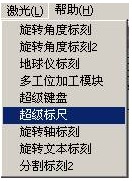
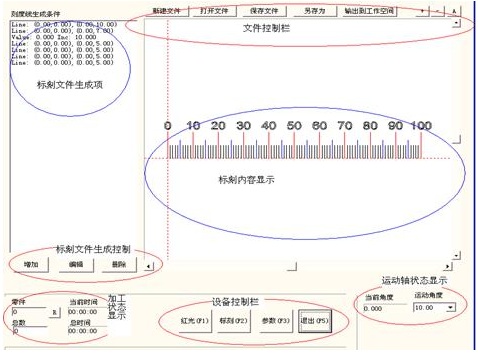
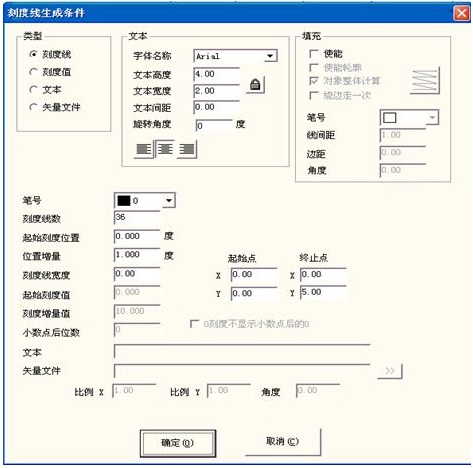
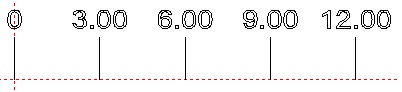
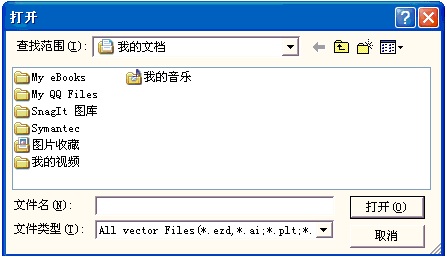
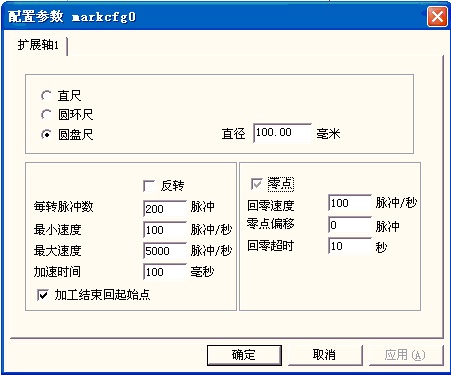
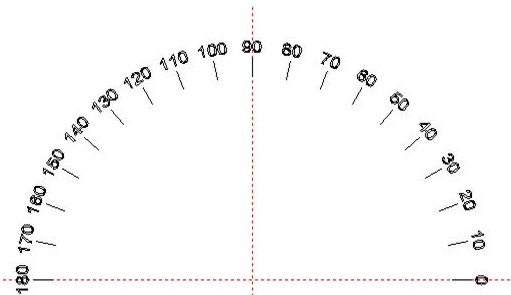
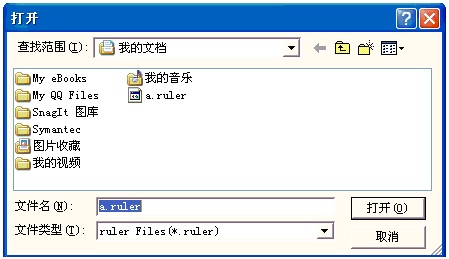
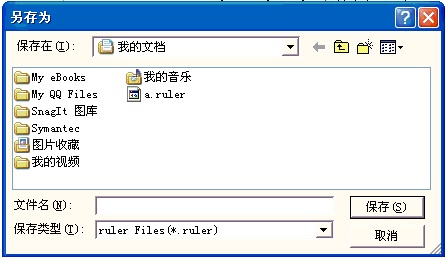
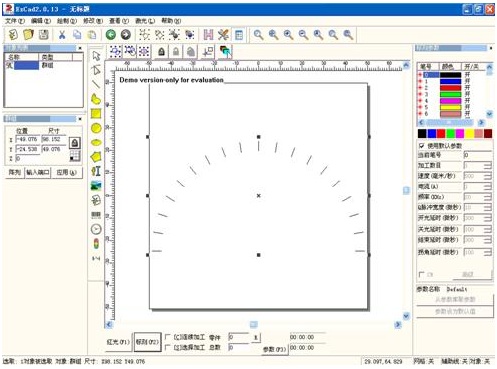
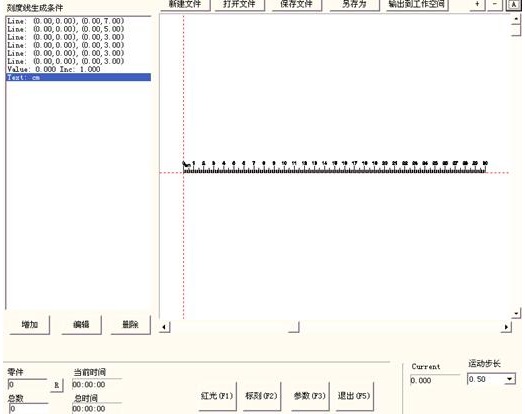
                    <p><a href="https://www.goldlaser.cn/jiguangdabiaoji/" class="tooltip-trigger tin"  title="查看更多关于 激光打标机 的文章" target="_blank">激光打标机</a>中的“超级标尺”功能主要是用来标刻各类刻度尺，使用时打开激光打标机软件的“激光”菜单中“超级标尺”选项，如下图8-22所示：</p><table cellspacing="0" cellpadding="0" width="620"><tbody style="margin: 0px; padding: 0px;"><tr class="firstRow" style="margin: 0px; padding: 0px; height: 191px;"><td height="191" style="margin: 0px; padding: 0px 7px;"><p><img alt="如何在激光打标机中刻印标尺  第1张" src="http://aimg8.dlszyht.net.cn/ueditor/image/125/248722/1501201319178595.jpg" width="128" height="175" style="margin: 0px; padding: 0px; border: 0px; vertical-align: top; max-width: 100%; height: auto !important;"/></p><p>图8-22</p></td></tr></tbody></table><p>打开“超级标尺”选项后软件会弹出如下图8-23所示对话框：</p><table cellspacing="0" cellpadding="0" width="620"><tbody style="margin: 0px; padding: 0px;"><tr class="firstRow" style="margin: 0px; padding: 0px; height: 392px;"><td height="392" style="margin: 0px; padding: 0px 7px;"><p><img alt="如何在激光打标机中刻印标尺  第2张" id="图片 41" src="http://aimg8.dlszyht.net.cn/ueditor/image/125/248722/1501201320135626.jpg" width="473" height="349" style="margin: 0px; padding: 0px; border: 0px; vertical-align: top; max-width: 100%; height: auto !important;"/></p><p>图8-23</p></td></tr></tbody></table><p>文件控制栏：</p><p>新建文件：删除所有操作，重新开始。</p><p>打开文件：打开电脑硬盘上已有的标刻文件，文件格式为.ruler。</p><p>保存文件：将现有生成文件保存到硬盘上。</p><p>另存为：目前的文件设置保存为另一文件。</p><p>输出到工作空间：将目前的文件设置转移到激光打标机主界面上作为普通标刻文件。</p><p>标刻文件生成控制：</p><p>增加：创建一个需要标刻内容，正常情况下一个标尺需要创建几个标刻内容。</p><p>编辑：在已创建的标刻内容需要修改时，选择需要修改项进行编辑。</p><p>删除：选择单个标刻内容删除。</p><p>点击“增加”按钮可以编写我们需要的刻度尺，如下图8-24所示</p><table cellspacing="0" cellpadding="0" width="620"><tbody style="margin: 0px; padding: 0px;"><tr class="firstRow" style="margin: 0px; padding: 0px; height: 499px;"><td height="499" style="margin: 0px; padding: 0px 7px;"><p><img alt="如何在激光打标机中刻印标尺  第3张" id="图片 42" src="http://aimg8.dlszyht.net.cn/ueditor/image/125/248722/1501201320219292.jpg" width="468" height="464" style="margin: 0px; padding: 0px; border: 0px; vertical-align: top; max-width: 100%; height: auto !important;"/></p><p>图8-24刻度线生成条件</p></td></tr></tbody></table><p>其中<a href="https://www.goldlaser.cn/canshu.html" class="tooltip-trigger tin"  title="查看更多关于 参数 的文章" target="_blank">参数</a>意义：</p><p>类型栏</p><p>刻度线：表示当前设定的参数为刻度线的参数值。</p><p>刻度值：表示当前设定的参数为刻度值的参数值。</p><p>文本：表示当前设定的参数为标刻文本的参数值。</p><p>矢量文件：表示当前设定的参数为导入的矢量文件的参数值。</p><p>文本栏：表示设定文本的各种参数。</p><p>旋转角度：指的是文本放置到图8-23时逆时针旋转的角度。</p><p>填充栏：设定文本的各种填充操作。</p><p>笔号：加工该设定所选用的笔号参数。</p><p>刻度线数：表示要加工此种刻度线的总线数。</p><p>起始位置：表示第一个刻度线的起始标刻位置。若为旋转标刻则其单位为度，若为平面标刻则其单位为毫米。</p><p>位置增量：表示相邻两个刻度线的间距，若为旋转标刻则其单位为度，若为平面标刻则其单位为毫米。</p><p>刻度线宽度：表示当前设定的刻度线的宽度。</p><p>起始点：表示当前设定的刻度线的起始点坐标。</p><p>终止点：表示当前设定的刻度线的终止点坐标。</p><p>起始刻度值：表示当前设定的刻度线的起始刻度值。</p><p>刻度值增量：表示当前设定的刻度线的刻度值增量。</p><p>小数点后位数：表示当前设定的刻度值的小数点的有效位数。例如：当设置小数点后位数为2时<img alt="如何在激光打标机中刻印标尺  第4张" id="图片 43" src="http://aimg8.dlszyht.net.cn/ueditor/image/125/248722/1501201321328889.jpg" width="177" height="26" style="margin: 0px; padding: 0px; border: 0px; vertical-align: top; max-width: 100%; height: auto !important;"/>，图8-23中的刻度值显示为<img alt="如何在激光打标机中刻印标尺  第5张" id="图片 44" src="http://aimg8.dlszyht.net.cn/ueditor/image/125/248722/1501201321597775.jpg" width="399" height="87" style="margin: 0px; padding: 0px; border: 0px; vertical-align: top; max-width: 100%; height: auto !important;"/></p><p>0刻度不显示小数点后的0：勾选表示0刻度值不显示小数点后边的0。</p><p>文本：显示在标尺上的文本信息。选择“文本”类型时，会看到</p><p><img alt="如何在激光打标机中刻印标尺  第6张" id="图片 45" src="http://aimg8.dlszyht.net.cn/ueditor/image/125/248722/1501201321471345.jpg" width="447" height="33" style="margin: 0px; padding: 0px; border: 0px; vertical-align: top; max-width: 100%; height: auto !important;"/>，可以在白色框内直接编写要标刻的文本内容。</p><p>矢量文件：显示在标尺上的矢量文件信息。选择“矢量文件”类型时，</p><p>会看到&nbsp;&nbsp;&nbsp;&nbsp;&nbsp;&nbsp;&nbsp;&nbsp;<img alt="如何在激光打标机中刻印标尺  第7张" id="图片 46" src="http://aimg8.dlszyht.net.cn/ueditor/image/125/248722/1501201301232181.jpg" width="480" height="26" style="margin: 0px; padding: 0px; border: 0px; vertical-align: top; max-width: 100%; height: auto !important;"/>，</p><p>点击<img alt="如何在激光打标机中刻印标尺  第8张" id="图片 47" src="http://aimg8.dlszyht.net.cn/ueditor/image/125/248722/1501201322164307.jpg" width="33" height="21" style="margin: 0px; padding: 0px; border: 0px; vertical-align: top; max-width: 100%; height: auto !important;"/>，出现</p><p><img alt="如何在激光打标机中刻印标尺  第9张" id="图片 48" src="http://aimg8.dlszyht.net.cn/ueditor/image/125/248722/1501201322886833.jpg" width="443" height="255" style="margin: 0px; padding: 0px; border: 0px; vertical-align: top; max-width: 100%; height: auto !important;"/></p><p>选择好矢量文件后，点击<img alt="如何在激光打标机中刻印标尺  第10张" id="图片 49" src="http://aimg8.dlszyht.net.cn/ueditor/image/125/248722/1501201323290896.jpg" width="83" height="21" style="margin: 0px; padding: 0px; border: 0px; vertical-align: top; max-width: 100%; height: auto !important;"/>即可。</p><p>比例X：导入时矢量文件的横向比例。</p><p>比例Y：导入时矢量文件的纵向比例。</p><p>角度：导入时矢量文件旋转的角度。</p><p>&nbsp;</p><p>图8-23中，左下方可设置需要加工的总次数，同时，当前加工数目、加工时间等信息也显示在该处。</p><p>相关的电机参数设置：</p><p>首先点击“参数”按钮设置电机的参数，如下图8-25所示</p><table cellspacing="0" cellpadding="0" width="620"><tbody style="margin: 0px; padding: 0px;"><tr class="firstRow" style="margin: 0px; padding: 0px; height: 404px;"><td height="404" style="margin: 0px; padding: 0px 7px;"><p><img alt="如何在激光打标机中刻印标尺  第11张" id="图片 50" src="http://aimg8.dlszyht.net.cn/ueditor/image/125/248722/1501201323834906.jpg" width="451" height="375" style="margin: 0px; padding: 0px; border: 0px; vertical-align: top; max-width: 100%; height: auto !important;"/></p><p>图8-25&nbsp;配置参数对话框</p></td></tr></tbody></table><p>&nbsp;</p><p>直尺∕圆环尺∕圆盘尺：表示当前加工的标尺的类型，勾选后有效。</p><p>圆盘尺的部分图形如下图8-26：</p><table cellspacing="0" cellpadding="0" width="620"><tbody style="margin: 0px; padding: 0px;"><tr class="firstRow" style="margin: 0px; padding: 0px; height: 357px;"><td height="357" style="margin: 0px; padding: 0px 7px; word-break: break-all;"><p><img alt="如何在激光打标机中刻印标尺  第12张" src="http://aimg8.dlszyht.net.cn/ueditor/image/125/248722/1501201324676591.jpg" style="margin: 0px; padding: 0px; border: 0px; vertical-align: top; max-width: 100%; height: auto !important;"/></p><p>图8-26&nbsp;圆盘尺部分图形</p></td></tr></tbody></table><p>直径：“圆环尺”或“圆盘尺”工件的实际直径大小。</p><p>反转：当电机的运转方向与实际标刻方向相反时反转电机运转方向。</p><p>每转脉冲数：电机旋转一圈需要的脉冲个数。计算公式为:</p><p>X=（360/N）* n</p><p>式中</p><p>X&nbsp;表示每转脉冲数；</p><p>N &nbsp;表示我们使用的电机的步距角；</p><p>n&nbsp;表示的是驱动器设定的细分数；</p><p>如：若电机步距角为1.8度，驱动器的细分数为16细分，那么这一电机的每转脉冲数为3200。</p><p>最小速度：电机运动过程中的最小运行速度。</p><p>最大速度：电机运动过程中的最大运行速度。</p><p>加速时间：电机运行中由最小速度运动到最大速度所需时间。</p><p>加工结束回起始点：勾选指将标刻完成后电机回到开始加工前的坐标位置。</p><p>零点:扩展轴零点设置选项。该选项为勾选状态，表示原点开关为常开型；不勾选状态表示原点开关为常闭型；若选项为灰色，表示设备没有零点。</p><p>在软件中扩展轴1的零点输入为默认IN0口。不用设置也不能修改</p><p>回零速度：电机回零点时的运行最大速度。</p><p>零点偏移：设置扩展轴回零动作结束后轴向正方向偏移零点的距离。&nbsp; &nbsp;</p><p>回零超时：设定扩展轴寻找零点所用的时间。超过设定时间后系统会提示“回零超时”。同时以此时轴所在位置为零点位置。</p><p>设置完电机参数后点击确定按钮，即可回到图8-25所示“超级标尺”界面。若已有做好的图形，可以直接使用&nbsp;“打开文件”按钮打开，如图8-27所示。</p><table cellspacing="0" cellpadding="0" width="620"><tbody style="margin: 0px; padding: 0px;"><tr class="firstRow" style="margin: 0px; padding: 0px; height: 285px;"><td height="285" style="margin: 0px; padding: 0px 7px;"><p><img alt="如何在激光打标机中刻印标尺  第13张" id="图片 52" src="http://aimg8.dlszyht.net.cn/ueditor/image/125/248722/1501201324108813.jpg" width="443" height="254" style="margin: 0px; padding: 0px; border: 0px; vertical-align: top; max-width: 100%; height: auto !important;"/></p><p>图8-27“打开”对话框</p></td></tr></tbody></table><p>&nbsp;图形做好后可使用“保存文件”或“另存为”按钮进行保存。如图8-28所示。</p><table cellspacing="0" cellpadding="0" width="620"><tbody style="margin: 0px; padding: 0px;"><tr class="firstRow" style="margin: 0px; padding: 0px; height: 285px;"><td height="285" style="margin: 0px; padding: 0px 7px;"><p><img alt="如何在激光打标机中刻印标尺  第14张" id="图片 53" src="http://aimg8.dlszyht.net.cn/ueditor/image/125/248722/1501201325357225.jpg" width="444" height="257" style="margin: 0px; padding: 0px; border: 0px; vertical-align: top; max-width: 100%; height: auto !important;"/></p><p>图8-28“保存”对话框</p></td></tr></tbody></table><p>如果要把做好的图形输出到工作空间，则点击“输出到工作空间”按钮，就会看到图形显示在空间里了，如下图8-29对话框。此时可以把图形在平面上标刻出来。</p><table cellspacing="0" cellpadding="0" width="620"><tbody style="margin: 0px; padding: 0px;"><tr class="firstRow" style="margin: 0px; padding: 0px; height: 404px;"><td height="404" style="margin: 0px; padding: 0px 7px;"><p><img alt="如何在激光打标机中刻印标尺  第15张" id="图片 54" src="http://aimg8.dlszyht.net.cn/ueditor/image/125/248722/1501201325271011.jpg" width="493" height="362" style="margin: 0px; padding: 0px; border: 0px; vertical-align: top; max-width: 100%; height: auto !important;"/></p><p>图8-29</p></td></tr></tbody></table><p>下面举例说明一个30cm（300mm）的直尺做法。<br/></p><p>首先选择刻度尺的类型为直尺，设置好电机的参数后，在图8-23中点击“增加”按钮后进入图8-24设置刻度线。</p><p>设置最长的十分刻度线：从0到300mm中的十分线，每隔10mm标刻一条，一共有31条。从工件的起始位置开始标刻，其长度为7mm。因此设置“刻度线数”是31，“起始刻度位置”是0，“位置增量”是10，起始点坐标（0，0），终止点坐标（0，7）；</p><p>再次点击“增加”按钮，设置5分刻度线：0到300中的五分线，一共有30条，从距工件起始位置5mm处开始标刻，每隔10mm标刻一条，其长度为5mm&nbsp;，因此“刻度线数”是30，“起始刻度位置”是5，“位置增量”是10，起始点坐标（0，0），终止点坐标（0，5）；</p><p>设置1分刻度线：0到300中的一分线，一共有240条，为了避免与10分刻度线和5分刻度线重合，1分刻度线需要设置四次：依次从距工件起始位置1mm，2mm，3mm，4mm处开始标刻，每隔5mm标刻一条，其长度为3mm&nbsp;，因此“刻度线数”都是60，“起始刻度位置”依次是1，2，3，4，“位置增量”都是5，起始点坐标都是（0，0），终止点坐标都是（0，3）；</p><p>设置刻度值：首先选择类型为“刻度值”，然后进行编辑：只输入十分刻度线的刻度值，因此“刻度线数”是31，“起始刻度位置”是0，“位置增量”是10，“起始刻度值”是0，“刻度增量值”是10，起始点坐标是（0，0），终止点坐标是（0，8）；</p><p>设置刻度尺的单位：选择“文本”，“刻度线数”是1，“起始刻度位置”和“起始点”根据实际情况填入，并输入要显示的文本内容。&nbsp;&nbsp;&nbsp;&nbsp;&nbsp;</p><p>最后在图8-23中显示为：</p><p><img alt="如何在激光打标机中刻印标尺  第16张" id="图片 4" src="http://aimg8.dlszyht.net.cn/ueditor/image/125/248722/1501201326282863.jpg" width="519" height="414" style="margin: 0px; padding: 0px; border: 0px; vertical-align: top; max-width: 100%; height: auto !important;"/></p><p>至此，30cm的直尺就做好了，单击“标刻”即可进行加工。</p><p><br/></p>                                        <p>本文链接：<a href="https://www.goldlaser.cn/news/746.html" title="如何在激光打标机中刻印标尺">https://www.goldlaser.cn/news/746.html</a>&nbsp;转载需授权！</p>                </div>
                                
                
            </div>
                                                <div class="content">
                <ul class="turn">
                    <li><span>上一章：</span><a href="https://www.goldlaser.cn/news/745.html" title="激光打标机旋转角度标刻功能">激光打标机旋转角度标刻功能</a></li>                    <li><span>下一章：</span><a href="https://www.goldlaser.cn/news/747.html" title="激光打标机端口参数">激光打标机端口参数</a></li>                </ul>
            </div>
                        
            
                                    <div class="list_it section">
    <h3></h3>
    <ul>
        <li><a href="https://www.goldlaser.cn/news/2555.html" title="使用激光除锈机时需要注意哪些安全问题？"><img class="lazy" data-src="https://www.goldlaser.cn/zb_users/theme/hnysnet/include/random/5.jpg" alt="使用激光除锈机时需要注意哪些安全问题？"></a>
    <h2><a title="使用激光除锈机时需要注意哪些安全问题？" href="https://www.goldlaser.cn/news/2555.html">使用激光除锈机时需要注意哪些安全问题？</a></h2>
    <p>使用激光除锈机，安全绝对是头等大事，我来帮你梳理关键点，让你操作时心里有底：一、核心安全原则‌眼睛保护‌：激光绝对不能照射人的眼睛，操作时必须佩戴‌专用激光防护眼镜‌，匹配设备波长（如CO₂激光需10...</p>
        <div class="info"><span><a href="https://www.goldlaser.cn/news/" title="操作指南">操作指南</a></span><span><i class="iconfont">&#xe6b0;</i>2026-01-17</span>    </div>
    </li>        <li><a href="https://www.goldlaser.cn/news/2554.html" title="最有效解决激光打标机Lmc硬件版本错误及Lmc驱动程序启动失败"><img class="lazy" data-src="https://www.goldlaser.cn/zb_users/upload/2025/12/202512311767148227281417.png" alt="最有效解决激光打标机Lmc硬件版本错误及Lmc驱动程序启动失败"></a>
    <h2><a title="最有效解决激光打标机Lmc硬件版本错误及Lmc驱动程序启动失败" href="https://www.goldlaser.cn/news/2554.html">最有效解决激光打标机Lmc硬件版本错误及Lmc驱动程序启动失败</a></h2>
    <p>使用JCZ打标机软件时，您经常会遇到这两个提示，Lmc硬件版本错误及Lmc驱动程序加载失败我们已找到最新方案，且效果极佳。更换USB数据线。2.机器接地。3.检查卡片是否损坏。若上述三种方法仍无法...</p>
        <div class="info"><span><a href="https://www.goldlaser.cn/news/" title="操作指南">操作指南</a></span><span><i class="iconfont">&#xe6b0;</i>2025-12-31</span>    </div>
    </li>        <li><a href="https://www.goldlaser.cn/news/2521.html" title="激光除锈机镜片使用维护指南"><img class="lazy" data-src="https://www.goldlaser.cn/zb_users/theme/hnysnet/include/random/4.jpg" alt="激光除锈机镜片使用维护指南"></a>
    <h2><a title="激光除锈机镜片使用维护指南" href="https://www.goldlaser.cn/news/2521.html">激光除锈机镜片使用维护指南</a></h2>
    <p>激光除锈设备中的机枪头镜片是核心光学元件，其清洁度和完好性直接影响激光传输效率和工作效果。以下是使用和维护时的关键注意事项：1.日常操作注意事项防尘防污：工作前确保环境清洁，避免粉尘、油污飞溅到镜片...</p>
        <div class="info"><span><a href="https://www.goldlaser.cn/news/" title="操作指南">操作指南</a></span><span><i class="iconfont">&#xe6b0;</i>2025-08-12</span>    </div>
    </li>        <li><a href="https://www.goldlaser.cn/news/2520.html" title="睿法系统显示振镜报警"><img class="lazy" data-src="https://www.goldlaser.cn/zb_users/theme/hnysnet/include/random/5.jpg" alt="睿法系统显示振镜报警"></a>
    <h2><a title="睿法系统显示振镜报警" href="https://www.goldlaser.cn/news/2520.html">睿法系统显示振镜报警</a></h2>
    <p>睿法系统显示振镜报警原因:1.15V开关电源没有跟24V开关电源同时通电。2.接到控制盒这边的±15V电源接反了3.15V开关电源烧坏。4.枪头上的9针插头没有接好或者这根信号线中间断路。5....</p>
        <div class="info"><span><a href="https://www.goldlaser.cn/news/" title="操作指南">操作指南</a></span><span><i class="iconfont">&#xe6b0;</i>2025-08-11</span>    </div>
    </li>        <li><a href="https://www.goldlaser.cn/news/2519.html" title="睿法枪头屏幕显示温度XXX或者显示的数值很大"><img class="lazy" data-src="https://www.goldlaser.cn/zb_users/theme/hnysnet/include/random/1.jpg" alt="睿法枪头屏幕显示温度XXX或者显示的数值很大"></a>
    <h2><a title="睿法枪头屏幕显示温度XXX或者显示的数值很大" href="https://www.goldlaser.cn/news/2519.html">睿法枪头屏幕显示温度XXX或者显示的数值很大</a></h2>
    <p>睿法枪头屏幕显示温度XXX或者显示的数值很大原因：1.受到氩弧焊信号干扰。2.系统故障。3.温度监控板烧掉。4.屏幕信号线和温控信号线接线的时候两个对换接错过。5.控制盒或者温控板信号线接触...</p>
        <div class="info"><span><a href="https://www.goldlaser.cn/news/" title="操作指南">操作指南</a></span><span><i class="iconfont">&#xe6b0;</i>2025-08-11</span>    </div>
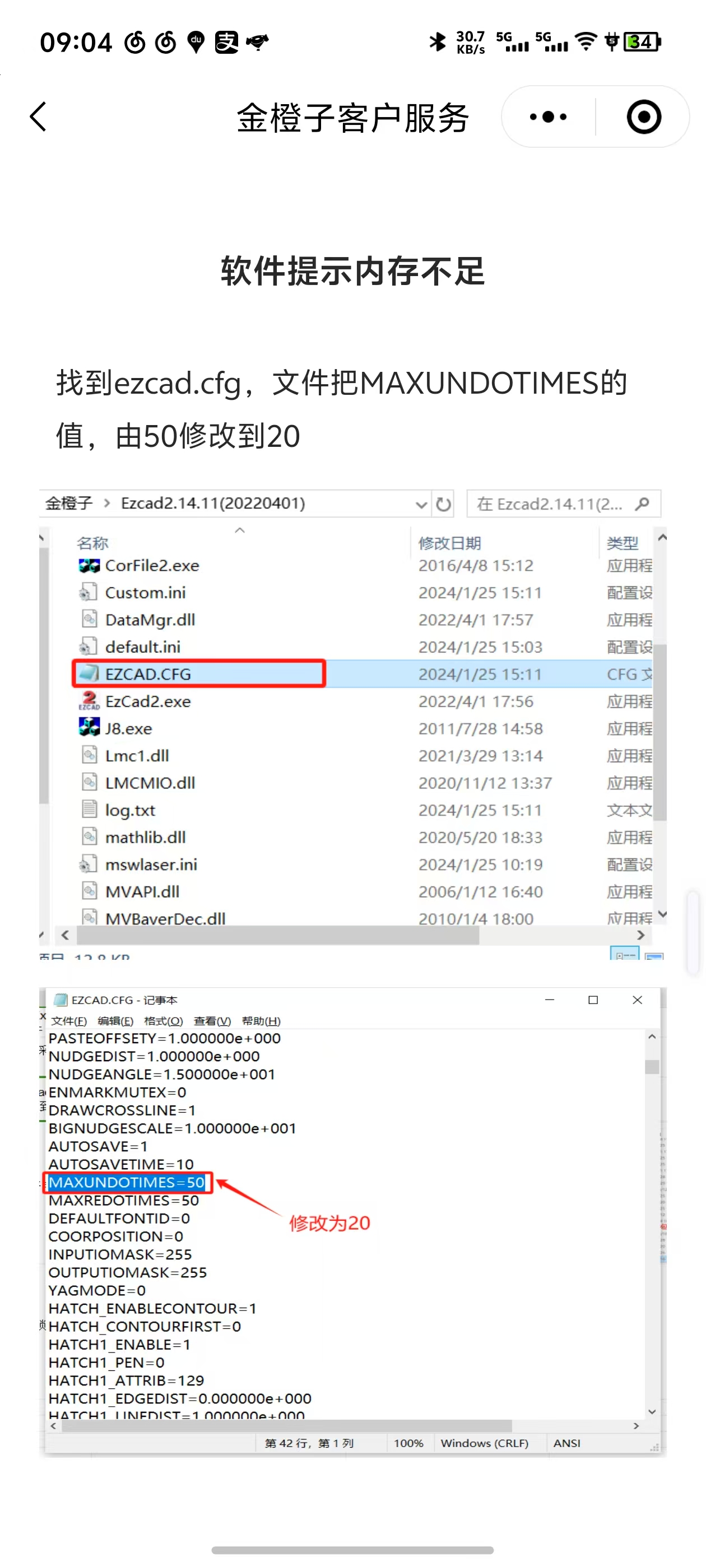
    </li>        <li><a href="https://www.goldlaser.cn/news/2358.html" title="金橙子软件工作时提示内存不足的解决办法"><img class="lazy" data-src="https://www.goldlaser.cn/zb_users/upload/2025/02/202502111739246172894203.jpg" alt="金橙子软件工作时提示内存不足的解决办法"></a>
    <h2><a title="金橙子软件工作时提示内存不足的解决办法" href="https://www.goldlaser.cn/news/2358.html">金橙子软件工作时提示内存不足的解决办法</a></h2>
    <p>金橙子软件工作时提示内存不足的解决办法：很多用户在使用机器过程中遇到过，下面图片是解决金橙子软件提示内存不足的解决办法只需要修改源文件里面的一个数值就可以了...</p>
        <div class="info"><span><a href="https://www.goldlaser.cn/news/" title="操作指南">操作指南</a></span><span><i class="iconfont">&#xe6b0;</i>2025-02-11</span>    </div>
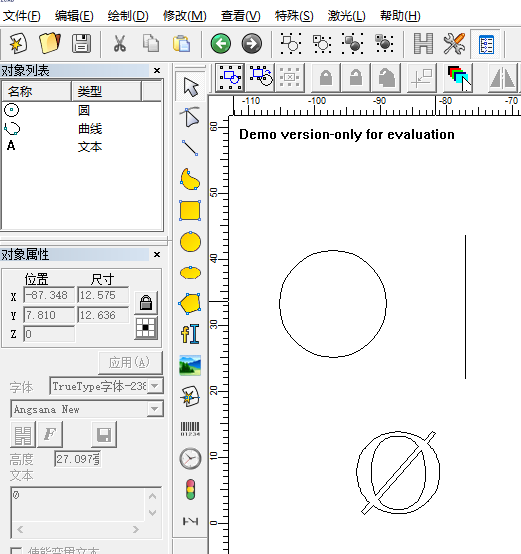
    </li>        <li><a href="https://www.goldlaser.cn/news/1586.html" title="直径符号怎么打出来激光打标机软件里"><img class="lazy" data-src="https://www.goldlaser.cn/zb_users/upload/2022/05/202205311653955466386079.png" alt="直径符号怎么打出来激光打标机软件里"></a>
    <h2><a title="直径符号怎么打出来激光打标机软件里" href="https://www.goldlaser.cn/news/1586.html">直径符号怎么打出来激光打标机软件里</a></h2>
    <p>激光打标机金橙子软件里面怎么样去打出直径的符号“Ø”？解决办法：1、百度搜索，在结果里面会出来这个符号，复制就可以了2、找到本篇文章，负责就可以了3、使用快捷键，左手按住ALT键。右手在数字键上面打出...</p>
        <div class="info"><span><a href="https://www.goldlaser.cn/news/" title="操作指南">操作指南</a></span><span><i class="iconfont">&#xe6b0;</i>2022-05-31</span>    </div>
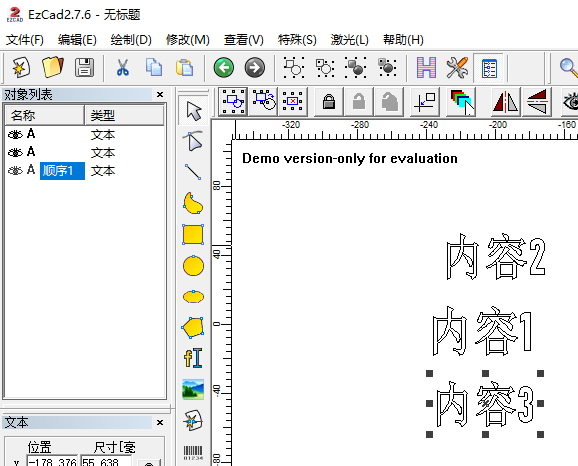
    </li>        <li><a href="https://www.goldlaser.cn/news/1583.html" title="激光打标机怎么设置打标内容的顺序"><img class="lazy" data-src="https://www.goldlaser.cn/zb_users/upload/2022/05/202205281653748782906191.png" alt="激光打标机怎么设置打标内容的顺序"></a>
    <h2><a title="激光打标机怎么设置打标内容的顺序" href="https://www.goldlaser.cn/news/1583.html">激光打标机怎么设置打标内容的顺序</a></h2>
    <p><a href="https://www.goldlaser.cn/jinchengzi.html" title="金橙子">#金橙子</a>激光打标机怎么设置打标内容的顺序？比如激光打标机控制金橙子软件里面有多个文本内容，怎么样才能按照我们想做的顺序来打标。下面我们来看一下：比如我添加了上图三个文本内容，在软件左侧对象列表里选中内容后双击...</p>
        <div class="info"><span><a href="https://www.goldlaser.cn/news/" title="操作指南">操作指南</a></span><span><i class="iconfont">&#xe6b0;</i>2022-05-28</span>    </div>
    </li>        <li><a href="https://www.goldlaser.cn/news/1574.html" title="复工秘籍：节后激光器复工指南"><img class="lazy" data-src="http://www.maxphotonics.com/vancheerfile/Images/2020/4/20200417104549742.png" alt="复工秘籍：节后激光器复工指南"></a>
    <h2><a title="复工秘籍：节后激光器复工指南" href="https://www.goldlaser.cn/news/1574.html">复工秘籍：节后激光器复工指南</a></h2>
    <p>节假日激光设备停机时间普遍较长，为助您快速顺利复工，我们精心准备了一份激光器复工指南，只需正确解锁，就能高效生产，助您开工大吉！温馨提示：如果集成商有更详细的指导说明，此复工秘籍可作为参考文件，酌情解...</p>
        <div class="info"><span><a href="https://www.goldlaser.cn/news/" title="操作指南">操作指南</a></span><span><i class="iconfont">&#xe6b0;</i>2022-05-16</span>    </div>
    </li>        <li><a href="https://www.goldlaser.cn/news/1573.html" title="怎样使红光指示与实际标刻图形完全重合"><img class="lazy" data-src="https://www.goldlaser.cn/zb_users/theme/hnysnet/include/random/3.jpg" alt="怎样使红光指示与实际标刻图形完全重合"></a>
    <h2><a title="怎样使红光指示与实际标刻图形完全重合" href="https://www.goldlaser.cn/news/1573.html">怎样使红光指示与实际标刻图形完全重合</a></h2>
    <p>尊敬的客户，您好！此问题可调整红光偏移位置、比例大小等参数，具体操作：修改“参数”工具栏----“其它”----&nbsp;“红光指示”栏下参数值；勾选“使能选择轮廓”，红光会显示图形的轨迹，否则，红...</p>
        <div class="info"><span><a href="https://www.goldlaser.cn/news/" title="操作指南">操作指南</a></span><span><i class="iconfont">&#xe6b0;</i>2022-05-16</span>    </div>
    </li>        </ul>
</div>
                    </div>
        <div class="scrollBox postright">


<div class="section relates_it">
    <h3>猜你还喜欢这些...<i class="iconfont">&#xe63e;</i></h3>
    <ul>
                   
      <li>
      <a href="https://www.goldlaser.cn/news/2555.html"><img src="https://www.goldlaser.cn/zb_users/theme/hnysnet/include/random/3.jpg" alt="使用激光除锈机时需要注意哪些安全问题？"></a>
        <h2><a href="https://www.goldlaser.cn/news/2555.html" title="使用激光除锈机时需要注意哪些安全问题？" target="_blank">使用激光除锈机时需要注意哪些安全问题？</a></h2>
        <p>使用激光除锈机，安全绝对是头等大事，我来帮你梳理关键点，让你操作时心里有底：一、...</p>
      </li>
       
      <li>
      <a href="https://www.goldlaser.cn/news/2554.html"><img src="https://www.goldlaser.cn/zb_users/upload/2025/12/202512311767148227281417.png" alt="最有效解决激光打标机Lmc硬件版本错误及Lmc驱动程序启动失败"></a>
        <h2><a href="https://www.goldlaser.cn/news/2554.html" title="最有效解决激光打标机Lmc硬件版本错误及Lmc驱动程序启动失败" target="_blank">最有效解决激光打标机Lmc硬件版本错误及Lmc驱动程序启动失败</a></h2>
        <p>使用JCZ打标机软件时，您经常会遇到这两个提示，Lmc硬件版本错误及Lmc驱动程...</p>
      </li>
       
      <li>
      <a href="https://www.goldlaser.cn/news/2521.html"><img src="https://www.goldlaser.cn/zb_users/theme/hnysnet/include/random/5.jpg" alt="激光除锈机镜片使用维护指南"></a>
        <h2><a href="https://www.goldlaser.cn/news/2521.html" title="激光除锈机镜片使用维护指南" target="_blank">激光除锈机镜片使用维护指南</a></h2>
        <p>激光除锈设备中的机枪头镜片是核心光学元件，其清洁度和完好性直接影响激光传输效率和...</p>
      </li>
       
      <li>
      <a href="https://www.goldlaser.cn/news/2520.html"><img src="https://www.goldlaser.cn/zb_users/theme/hnysnet/include/random/1.jpg" alt="睿法系统显示振镜报警"></a>
        <h2><a href="https://www.goldlaser.cn/news/2520.html" title="睿法系统显示振镜报警" target="_blank">睿法系统显示振镜报警</a></h2>
        <p>睿法系统显示振镜报警原因:1.15V开关电源没有跟24V开关电源同时通电。2....</p>
      </li>
       
      <li>
      <a href="https://www.goldlaser.cn/news/2519.html"><img src="https://www.goldlaser.cn/zb_users/theme/hnysnet/include/random/2.jpg" alt="睿法枪头屏幕显示温度XXX或者显示的数值很大"></a>
        <h2><a href="https://www.goldlaser.cn/news/2519.html" title="睿法枪头屏幕显示温度XXX或者显示的数值很大" target="_blank">睿法枪头屏幕显示温度XXX或者显示的数值很大</a></h2>
        <p>睿法枪头屏幕显示温度XXX或者显示的数值很大原因：1.受到氩弧焊信号干扰。2....</p>
      </li>
       
          </ul>
</div>        </div>     </div>
</div>    <footer>
  <div class="container">
           <div class="footer_box">
                <div class="footer_url uw">
        <div class="ft">服务</div>        <ul>
        <li> <a href="https://www.goldlaser.cn/jiagong/">激光刻字加工</a></li>
<li> <a href="https://www.goldlaser.cn/jiguangchuxiuji/">激光除锈机厂家</a></li>
        </ul>
        </div>
                        <div class="footer_url uw">
        <div class="ft">地图</div>        <ul>
        <li> <a href="/sitemap.xml">xml</a></li>
<li> <a href="/sitemap.html">html</a></li>        </ul>
        </div>
                        <div class="footer_url uw">
        <div class="ft">热门</div>        <ul>
        <li> <a href="https://www.goldlaser.cn/shouchishijiguanghanjieji/">手持激光焊接机厂家</a></li>
<li> <a href="https://www.goldlaser.cn/gongyeban/1954.html">玻璃激光打孔机</a></li>        </ul>
        </div>
                
                <div class="footer_qrcode qw">
        <div class="ft">微信号</div>
        <img src="https://www.goldlaser.cn/zb_users/upload/2021/09/202109231632367365153972.jpg">
        <p></p>
        </div>
                        <div class="footer_qrcode qw">
        <div class="ft">服务号</div>
        <img src="https://www.goldlaser.cn/zb_users/upload/2021/11/202111151636968147282746.jpg">
        <p></p>
        </div>
          </div>
      <div class="clear"></div>
             <div class="copyright">
       <p><span >&nbsp;&nbsp;浪起激光是以<a href="https://www.goldlaser.cn/jiguangdabiaoji/">激光打标机</a>、<a href="/jiguangqingxiji/">激光清洗机</a>、手持式激光焊接机、<a href="https://www.goldlaser.cn/">激光除锈机</a>为主导产品的生产厂家，产品销往全球80余国家，出口品质，值得信赖！了解请拨：15964514888<script>
var _hmt = _hmt || [];
(function() {
  var hm = document.createElement("script");
  hm.src = "https://hm.baidu.com/hm.js?45247980dba73fc2df70eee34581fcf7";
  var s = document.getElementsByTagName("script")[0]; 
  s.parentNode.insertBefore(hm, s);
})();
</script></span></p>
      </div>
  </div>
</footer>
<script language="javascript">function imgdragstart(){return false;}for(i in document.images)document.images[i].ondragstart=imgdragstart;$(document).keydown(function(){return key(arguments[0])});function key(e){var keynum;if(window.event){keynum=e.keyCode;}else if(e.which){keynum=e.which;} if(keynum==123){window.close();return false;}}
</script>

<div class="kfwx">
    <div class="wx_content">
    <span class="iconfont">&#xe6c3;</span>
    <img src="https://www.goldlaser.cn/zb_users/upload/2020/10/202010271603802109321559.jpg">
        </div>
</div>
<script src="https://www.goldlaser.cn/zb_users/theme/hnysnet/script/jquery.theme.1.3.js"></script>
<script src="https://www.goldlaser.cn/zb_users/theme/hnysnet/script/jquery.lazyload.js?v=1.9.3"></script>
<script>$(function(){$("img.lazy").lazyload({placeholder:"https://www.goldlaser.cn/zb_users/theme/hnysnet/style/images/grey.gif",threshold:1000,effect:"fadeIn",data_attribute  : "src",})});</script>
<script src="https://www.goldlaser.cn/zb_users/theme/hnysnet/script/jquery.scrollBox.left.js"></script>
</body>
</html><!--5,434.62 ms , 26 queries , 2232kb memory , 0 error-->